
A phone game: Starfall
Stars and rocks fall through the night. Hold your finger on the screen and
the basket goes to it: catch a star for a point, miss one and lose a life,
catch a rock and lose one too. After three, the game is over, and the best
score is kept for next time. The finished game is
examples/starfall.
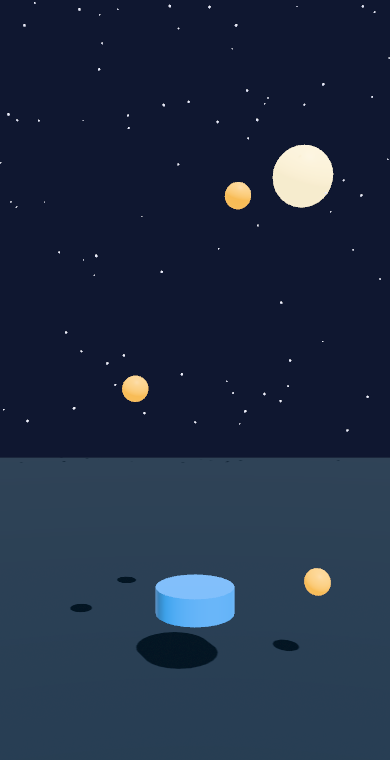
This tutorial goes faster than Roll: it takes the
objects, components and onUpdate from there as known, and spends its time
on what a phone game needs.
1. A portrait app
Section titled “1. A portrait app”Starfall needs no physics: things fall by their own code, and a catch is a
distance check. shared_preferences keeps the best score:
fynkel create starfallcd starfallflutter pub add shared_preferencesEmpty lib/main.dart and delete test/game_test.dart, as in Roll.
To keep it upright, list only UIInterfaceOrientationPortrait under
UISupportedInterfaceOrientations in ios/Runner/Info.plist, and add
android:screenOrientation="portrait" to the activity in
android/app/src/main/AndroidManifest.xml. On a Mac, a phone-shaped
window is handy for trying it: in macos/Runner/MainFlutterWindow.swift,
set windowFrame.size = NSSize(width: 420, height: 760) before the
window takes it.
2. The night
Section titled “2. The night”The scenery is plain objects that never move: a dark hill, a moon, and
ninety far stars. Objects that don’t move cost next to nothing a frame.
world.sky = null turns off the daylight sky, so the camera’s clear
colour is the night, lit only by the game’s own lights.
import 'dart:math' as math;
import 'package:fynkel/fynkel.dart';
/// The scenery: a dark hill under the basket, a moon, and far stars. None/// of it moves, so it costs next to nothing each frame.GameObject night() {  final random = math.Random(4);  final far = Material(color: const Color(0xFFFFFFFF), emissive: const Color(0xFFCFD8FF));  return GameObject(    name: 'night',    children: [      GameObject(        name: 'ground',        transform: Transform(position: Vec3(0, -2.5, -15), scale: Vec3(90, 2, 50)),        components: [MeshRenderer(Mesh.cube(), Material(color: const Color(0xFF1C2B3A), roughness: 1))],      ),      GameObject(        name: 'moon',        transform: Transform(position: Vec3(9, 22, -40), scale: Vec3.one * 5),        components: [          MeshRenderer(Mesh.sphere(), Material(color: const Color(0xFFFFF4D6), emissive: const Color(0xFFE8DDBF))),        ],      ),      for (var i = 0; i < 90; i++)        GameObject(          transform: Transform(            position: Vec3(random.nextDouble() * 34 - 17, random.nextDouble() * 34 + 1, -35),            scale: Vec3.one * (0.08 + random.nextDouble() * 0.12),          ),          components: [MeshRenderer(Mesh.sphere(), far)],        ),    ],  );}
3. The basket: following a finger
Section titled “3. The basket: following a finger”input.fingers are the touches on the screen now, and the mouse; one
that isPressed is down. screenPointToPlane turns the point under
a finger into a point in the world, where the ray through it meets a
plane: here the upright plane the stars fall in, so the basket goes to
the same x as the finger. A, D and the arrow keys move it too
(input.axis2('move')), for playing on a Mac.
import 'package:fynkel/fynkel.dart';
/// The basket at the bottom. It goes to the point under the finger (or/// the mouse, held down), or left and right with A, D or the arrow keys.class Basket extends GameObject {  Basket()    : super(        name: 'basket',        components: [MeshRenderer(Mesh.cylinder(), Material(color: const Color(0xFF4FB3FF), roughness: 0.4))],      ) {    localScale = Vec3(1.8, 0.3, 1.8);  }
  /// How far it may go from the middle, either way.  static const reach = 3.2;
  /// Metres a second, with the keys.  static const keySpeed = 9.0;
  /// The plane the stars fall in, for the point under a finger.  static final _field = Plane(Vec3.forward, Vec3.zero);
  @override  void onUpdate() {    super.onUpdate();    var x = position.x + input.axis2('move').x * keySpeed * time.delta;    for (final finger in input.fingers) {      if (!finger.isPressed) continue;      final point = world.camera?.screenPointToPlane(finger.position, _field);      if (point != null) x = point.x;      break;    }    position = Vec3(x.clamp(-reach, reach), position.y, position.z);  }}
4. Falling things, from a pool
Section titled “4. Falling things, from a pool”A long game drops hundreds of stars. Making a new object for each, and
destroying it after, works, but a Pool is the habit worth having
for anything made and thrown away often: shots, enemies, effects.
pool.get(reset) hands out a hidden object (or makes one when none is
waiting) after reset has set it up, and release() hides it again for
the next get.
A Falling is a star or a rock: the same object either way, with its
material and size set in launch, which the game calls in get’s
reset.
import 'package:fynkel/fynkel.dart';
/// A star to catch, or a rock to keep away from.enum Kind { star, rock }
/// One falling thing. The game hands them out from a pool and gives them/// back when they're caught or fall past the basket, so a long game makes/// no new objects.class Falling extends GameObject {  Falling() : super(components: [MeshRenderer(Mesh.sphere(), _starMaterial)]);
  static final _starMaterial = Material(color: const Color(0xFFFFD45A), emissive: const Color(0xFFFFB020));  static final _rockMaterial = Material(color: const Color(0xFF6B5E57), roughness: 0.9);
  late Kind kind;
  /// Metres a second, downwards.  var speed = 0.0;
  late final _renderer = get<MeshRenderer>()!;
  /// Sets it up for another fall: called by the pool's `get` before it's shown.  void launch(Kind kind, Vec3 from, double speed) {    this.kind = kind;    this.speed = speed;    position = from;    _renderer.material = kind == Kind.star ? _starMaterial : _rockMaterial;    localScale = kind == Kind.star ? Vec3.one * 0.6 : Vec3.one * 0.8;  }
  @override  void onUpdate() {    super.onUpdate();    position = position + Vec3(0, -speed * time.delta, 0);    rotate(Vec3.up, 2 * time.delta);  }}
5. Sparks that go back by themselves
Section titled “5. Sparks that go back by themselves”A catch makes a puff of sparks: a ParticleSystem with one Burst,
not looping. StopAction.disable turns its object off when the last
spark is gone, and one from a pool goes back to it then, so the game
never has to release it. simulationSpace: ParticleSpace.world leaves
sparks where they were made.
import 'package:fynkel/fynkel.dart';
/// A puff of sparks where something was caught. It plays when the pool/// hands it out, and goes back to the pool by itself when its last spark/// is gone (`StopAction.disable`).class Sparkle extends GameObject {  Sparkle()    : super(        components: [          ParticleSystem(            looping: false,            duration: 0.2,            startSpeed: const Range(2, 5),            startSize: const Range(0.1, 0.25),            startLifetime: const Range(0.3, 0.6),            gravityModifier: 0.5,            simulationSpace: ParticleSpace.world,            stopAction: StopAction.disable,            emission: Emission(rateOverTime: 0, bursts: [Burst(count: const Range(25, 35))]),            shape: const ParticleShape.sphere(radius: 0.2),            colorOverLifetime: ColorGradient.fadeOut(),            material: Material(color: Color.white, blending: Blending.additive),          ),        ],      );
  /// Its sparks' colour, set before it plays.  set color(Color value) => get<ParticleSystem>()!.startColor = value;}
6. The game
Section titled “6. The game”The game object holds the state Flutter shows, as ValueNotifiers:
phase (the title, playing, or over), score, lives and best.
startgives back anything still falling, resets the numbers and starts the drops._dropis a routine:startRoutineruns it alongside the frames, andawait wait(seconds)waits that long in game time. It drops something, waits less as the score grows, and stops when the game is over. A loop in a routine reads as what it does, with no timer fields.onUpdatechecks each falling thing against the basket. It walks the pool’s handed-out objects withactiveAtfrom the end, so it can release them as it goes, and makes no list each frame.punchScalegives the basket a little bounce on a catch: a tween that springs back by itself.
import 'dart:math' as math;
import 'package:flutter/foundation.dart';import 'package:fynkel/fynkel.dart';
import 'basket.dart';import 'falling.dart';import 'night.dart';import 'sparkle.dart';
/// Where the game is: the title, playing, or over.enum Phase { title, playing, over }
/// The game: stars and rocks fall, the basket catches them. A star is a/// point and a missed star costs a life; a rock caught costs a life.class StarfallGame extends GameObject {  StarfallGame({int best = 0, this.seed}) : best = ValueNotifier(best);
  /// For tests: the same falls each time.  final int? seed;
  final phase = ValueNotifier(Phase.title);  final score = ValueNotifier(0);  final lives = ValueNotifier(3);
  /// The best score: the app saves it whenever it changes.  final ValueNotifier<int> best;
  late final Basket basket;  late final falling = Pool(this, Falling.new);  late final sparkles = Pool(this, Sparkle.new);  late math.Random _random;
  /// The top of the field, where things start, and the bottom, past which  /// they're missed.  static const top = 12.0, bottom = -2.0;
  @override  void onLoad() {    super.onLoad();    world.sky = null; // a night: the camera's clear colour, and our own lights    add(      GameObject(        transform: Transform.lookAt(Vec3(0, 5, 15), Vec3(0, 5, 0)),        components: [Camera(clearColor: const Color(0xFF101830))],      ),    );    add(      GameObject(        transform: Transform(rotation: Quat.lookRotation(Vec3(-0.3, -1, -0.6))),        components: [Light.sun(intensity: 2)],      ),    );    add(GameObject(components: [Light.ambient(intensity: 0.5)]));    add(night());    basket = add(Basket());    sparkles.prewarm(8);    falling.prewarm(20);  }
  /// Starts a new game, from the title or after one is over.  void start() {    for (var i = falling.countActive - 1; i >= 0; i--) {      falling.activeAt(i).release();    }    _random = math.Random(seed);    score.value = 0;    lives.value = 3;    basket.position = Vec3.zero;    phase.value = Phase.playing;    startRoutine(_drop);  }
  /// Drops something every so often, faster as the score goes up, until  /// the game is over.  Future<void> _drop() async {    while (phase.value == Phase.playing) {      final kind = _random.nextDouble() < 0.25 ? Kind.rock : Kind.star;      final x = (_random.nextDouble() * 2 - 1) * Basket.reach;      final speed = 4 + score.value * 0.08;      falling.get((thing) => thing.launch(kind, Vec3(x, top, 0), speed));      await wait(math.max(0.35, 1.1 - score.value * 0.02));    }  }
  @override  void onUpdate() {    super.onUpdate();    if (phase.value != Phase.playing) return;    // Walk from the end: a release moves the last one into its place.    for (var i = falling.countActive - 1; i >= 0; i--) {      final thing = falling.activeAt(i);      final at = thing.position;      final caught = (at.y - basket.position.y).abs() < 0.4 && (at.x - basket.position.x).abs() < 1.1;      if (caught) {        _caught(thing);      } else if (at.y < bottom) {        thing.release();        if (thing.kind == Kind.star) _loseLife();      }    }  }
  void _caught(Falling thing) {    final star = thing.kind == Kind.star;    sparkles.get(      (sparkle) => sparkle        ..position = thing.position        ..color = star ? const Color(0xFFFFD45A) : const Color(0xFFFF5A4A),    );    thing.release();    if (star) {      score.value++;      basket.punchScale(Vec3(0.3, 0.1, 0.3), seconds: 0.2);    } else {      _loseLife();    }  }
  void _loseLife() {    lives.value--;    if (lives.value > 0) return;    phase.value = Phase.over;    if (score.value > best.value) best.value = score.value;  }}
7. Screens in Flutter
Section titled “7. Screens in Flutter”The title, the score and lives, and the game over panel are Flutter
widgets over the game. One ValueListenableBuilder on phase picks
which; the HUD rebuilds only when the score or lives change. The buttons
call the game’s start directly: the overlay has the game.
import 'package:flutter/material.dart';
import 'game.dart';
/// Everything Flutter draws over the game: the title, the score and lives/// while playing, and the game over panel.class Screens extends StatelessWidget {  const Screens(this.game, {super.key});
  final StarfallGame game;
  @override  Widget build(BuildContext context) => ValueListenableBuilder(    valueListenable: game.phase,    builder: (context, phase, _) => switch (phase) {      Phase.title => _Panel(        title: 'Starfall',        lines: ['Catch the stars, not the rocks.', 'Best: ${game.best.value}'],        button: 'Play',        onPressed: game.start,      ),      Phase.playing => _Hud(game),      Phase.over => _Panel(        title: 'Game over',        lines: ['Score: ${game.score.value}', 'Best: ${game.best.value}'],        button: 'Play again',        onPressed: game.start,      ),    },  );}
class _Hud extends StatelessWidget {  const _Hud(this.game);
  final StarfallGame game;
  @override  Widget build(BuildContext context) => SafeArea(    child: Padding(      padding: const EdgeInsets.all(16),      child: ListenableBuilder(        listenable: Listenable.merge([game.score, game.lives]),        builder: (context, _) => Row(          children: [            Text('${game.score.value}', style: _big),            const Spacer(),            Text('♥' * game.lives.value, style: _big.copyWith(color: const Color(0xFFFF6A6A))),          ],        ),      ),    ),  );}
class _Panel extends StatelessWidget {  const _Panel({required this.title, required this.lines, required this.button, required this.onPressed});
  final String title;  final List<String> lines;  final String button;  final VoidCallback onPressed;
  @override  Widget build(BuildContext context) => Center(    child: Card(      color: const Color(0xE0202A48),      child: Padding(        padding: const EdgeInsets.all(28),        child: Column(          mainAxisSize: MainAxisSize.min,          children: [            Text(title, style: _big.copyWith(fontSize: 36)),            const SizedBox(height: 12),            for (final line in lines) Text(line, style: const TextStyle(color: Colors.white70, fontSize: 18)),            const SizedBox(height: 20),            FilledButton(onPressed: onPressed, child: Text(button)),          ],        ),      ),    ),  );}
const _big = TextStyle(color: Colors.white, fontSize: 28, fontWeight: FontWeight.bold);
8. Keeping the best score
Section titled “8. Keeping the best score”One number to keep needs no more than shared_preferences. main reads
it before the app starts, hands it to the game, and saves it whenever the
game’s best changes:
import 'package:flutter/widgets.dart';import 'package:fynkel_flutter/fynkel_flutter.dart';import 'package:shared_preferences/shared_preferences.dart';
import 'game.dart';import 'screens.dart';
Future<void> main() async {  WidgetsFlutterBinding.ensureInitialized();  // One number to keep: shared_preferences is enough (https://fynkel.com/making/saving/).  final prefs = await SharedPreferences.getInstance();  runApp(    FynkelApp(      () {        final game = StarfallGame(best: prefs.getInt('best') ?? 0);        game.best.addListener(() => prefs.setInt('best', game.best.value));        return game;      },      title: 'Starfall',      overlay: (context, game) => Screens(game),    ),  );}
(For a save with more in it, a level and what was found, write a file: Saving shows how.)
Run it on a phone or the Mac:
flutter run9. Tests
Section titled “9. Tests”The tests run the game with no window, in a phone-sized view, so a
finger’s point on the screen lands where it would on a phone.
input.simulate.fingerDown and fingerMove play the finger. The last
test but one plays a minute and checks the pools stopped growing: every
star, rock and spark came back.
import 'dart:io';
import 'package:flutter_test/flutter_test.dart';import 'package:fynkel/fynkel.dart';import 'package:fynkel/testing.dart';import 'package:starfall/falling.dart';import 'package:starfall/game.dart';
void main() {  late World world;  late StarfallGame game;
  setUp(() {    // A phone's portrait view: the finger's point on the field depends on it.    world = World()..input.simulate.resize(390, 760);    game = world.add(StarfallGame(seed: 1));    world.run(0.1);  });  tearDown(() => world.dispose());
  /// Drops [kind] just above the basket.  Falling dropOnBasket(Kind kind) =>      game.falling.get((thing) => thing.launch(kind, game.basket.position + Vec3(0, 1, 0), 4));
  test('nothing falls on the title, and Play starts it falling', () {    world.run(2);    expect(game.falling.countActive, 0);    game.start();    world.run(2);    expect(game.phase.value, Phase.playing);    expect(game.falling.countActive, greaterThan(0));  });
  test('a star caught scores, a rock caught costs a life', () {    game.start();    dropOnBasket(Kind.star);    world.run(0.4);    expect(game.score.value, 1);    dropOnBasket(Kind.rock);    world.run(0.4);    expect(game.lives.value, 2);  });
  test('the basket follows a finger held on the screen', () {    game.start();    // The right side of the screen, near the bottom.    world.input.simulate.fingerDown(1, 330, 600);    world.run(0.1);    expect(game.basket.position.x, greaterThan(2));    world.input.simulate.fingerMove(1, 60, 600);    world.run(0.1);    expect(game.basket.position.x, lessThan(-2));    world.input.simulate.fingerUp(1, 60, 600);  });
  test('three lives lost ends it, and the best score is kept', () {    game.start();    for (var i = 0; i < 5; i++) {      dropOnBasket(Kind.star);      world.run(0.4);    }    for (var i = 0; i < 3; i++) {      dropOnBasket(Kind.rock);      world.run(0.4);    }    expect(game.phase.value, Phase.over);    expect(game.best.value, greaterThanOrEqualTo(5));  });
  test('a long game makes no new objects: they come back to their pools', () {    game.start();    game.lives.value = 1000; // a minute of play, never over    world.run(30);    expect(game.phase.value, Phase.playing);    expect(game.sparkles.countAll, greaterThan(0), reason: 'some were caught');    final made = game.falling.countAll + game.sparkles.countAll;    world.run(30);    expect(game.falling.countAll + game.sparkles.countAll, made);  });
  test('a picture, mid-game', () {    final view = HeadlessView(world, width: 390, height: 760);    addTearDown(view.dispose);    game.start();    world.run(4);    Directory('build').createSync();    File('build/starfall.png').writeAsBytesSync(view.png());  });}
Where next
Section titled “Where next”- Make it yours: a star worth five that falls faster, a shield that saves one life, a sound on each catch (Playing sounds).
- Particles has much more: trails, colour by speed, collisions.
- Measuring says what to measure on a phone, and how.