
Your first game: Roll
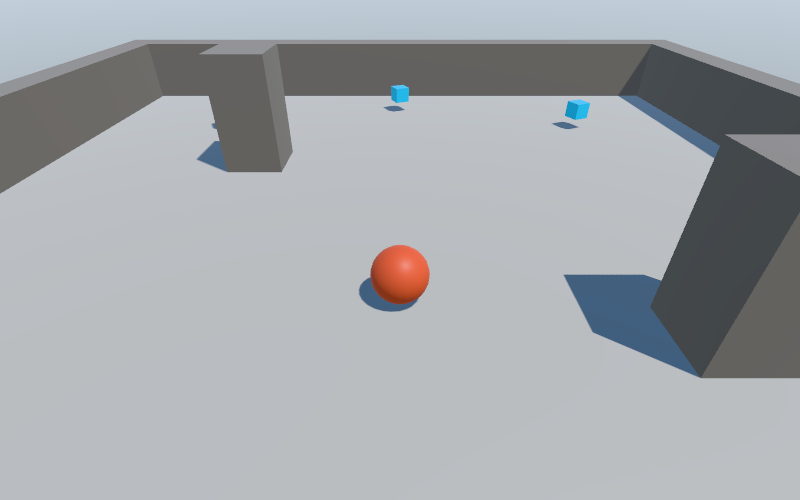
You’ll make Roll: a ball you roll with the keys, five gems to take, and
a camera that follows the ball without going through the walls. It takes
about half an hour, and it touches most of what a Fynkel game is made of.
The finished game is examples/roll,
and the code below is that game’s, file by file.
1. A new app
Section titled “1. A new app”Install and first game says what you need. Physics is a package of its own, and Roll needs it for the ball:
fynkel create roll --physicscd rollEmpty lib/main.dart and delete test/game_test.dart: you’ll write both
anew.
2. The level: objects with components
Section titled “2. The level: objects with components”Everything in a Fynkel game is a GameObject: it has a Transform
(where it is, how it’s turned, how big) and components that give it
its parts. A MeshRenderer draws a mesh in a material; a BoxCollider
makes it solid to physics. The collider takes the object’s scale, so one
BoxCollider() fits a box of any size.
level() makes the floor, four walls and two pillars as children of one
object:
import 'package:fynkel/fynkel.dart';import 'package:fynkel_physics/fynkel_physics.dart';
/// A box that stays put: the floor, a wall, a pillar. Its collider takes/// the object's scale, so one `BoxCollider()` fits however big it is.GameObject block(Vec3 position, Vec3 size, Color color) => GameObject(  transform: Transform(position: position, scale: size),  components: [    MeshRenderer(Mesh.cube(), Material(color: color)),    BoxCollider(),  ],);
/// The floor, 20 m across, walls round it, and two pillars to hide behind.GameObject level() {  const stone = Color(0xFFB8B0A0);  const wall = Color(0xFF8A7F70);  return GameObject(    name: 'level',    children: [      block(const Vec3(0, -0.5, 0), const Vec3(20, 1, 20), stone),      block(const Vec3(0, 1, -10.5), const Vec3(22, 2, 1), wall),      block(const Vec3(0, 1, 10.5), const Vec3(22, 2, 1), wall),      block(const Vec3(-10.5, 1, 0), const Vec3(1, 2, 20), wall),      block(const Vec3(10.5, 1, 0), const Vec3(1, 2, 20), wall),      block(const Vec3(-4, 1.5, -3), const Vec3(1.5, 3, 1.5), wall),      block(const Vec3(5, 1.5, 4), const Vec3(1.5, 3, 1.5), wall),    ],  );}
3. The ball: a rigidbody pushed by the keys
Section titled “3. The ball: a rigidbody pushed by the keys”A Rigidbody puts an object under physics: gravity pulls the ball
down, the floor holds it up, and it rolls when pushed. Ball is a
GameObject subclass, so it can have code of its own, as a Unity
MonoBehaviour would:
onFixedUpdateruns at physics’ own steady rate, the place to push a body.input.axis2('move')is W, A, S, D and the arrows as one value from −1 to 1 each way.- The push goes the way the camera looks, flattened onto the floor, so “up” always rolls away from you however the camera has turned.
interpolationsmooths what’s drawn between physics steps.
import 'package:fynkel/fynkel.dart';import 'package:fynkel_physics/fynkel_physics.dart';
/// The player: a ball that W, A, S, D or the arrows roll, away from the/// camera and across it, whichever way the camera looks.class Ball extends GameObject {  Ball()    : super(        name: 'ball',        transform: Transform(position: const Vec3(0, 1, 3)),        components: [          MeshRenderer(Mesh.sphere(), Material(color: const Color(0xFFE0613A))),          SphereCollider(),          Rigidbody(mass: 1, interpolation: RigidbodyInterpolation.interpolate),        ],      );
  late final Rigidbody body = get<Rigidbody>()!;
  /// Pushes are worked out in a fixed step, as physics runs, so the ball  /// rolls the same at 60 or 120 frames a second.  @override  void onFixedUpdate() {    super.onFixedUpdate();    final move = input.axis2('move');    final camera = world.camera?.gameObject;    if (camera == null || move.length == 0) return;    // The camera's forward and right, flat on the floor.    final forward = Vec3(camera.forward.x, 0, camera.forward.z).normalized;    final right = Vec3(camera.right.x, 0, camera.right.z).normalized;    body.addForce((forward * move.y + right * move.x) * 12);  }}
4. Gems: triggers
Section titled “4. Gems: triggers”A collider with isTrigger: true isn’t solid: things pass through it,
and it says so. Mixing Triggers into the object gives it
onTriggerEnter, called when another collider comes in. The gem checks
it’s the ball, tells the game, and destroys itself. onUpdate runs every
frame; time.delta is the frame’s seconds, so the gem spins at the same
speed at any frame rate.
import 'package:fynkel/fynkel.dart';import 'package:fynkel_physics/fynkel_physics.dart';
import 'ball.dart';
/// A gem that spins where it is, and is taken when the ball rolls into it.class Gem extends GameObject with Triggers {  Gem(Vec3 at, {required this.onTaken})    : super(        name: 'gem',        transform: Transform(position: at, scale: Vec3.all(0.5)),        components: [          MeshRenderer(Mesh.cube(), Material(color: const Color(0xFF3AC0E0), emissive: const Color(0xFF105060))),          BoxCollider(isTrigger: true),        ],      );
  /// What it tells the game when it's taken.  final void Function() onTaken;
  @override  void onUpdate() {    super.onUpdate();    rotate(Vec3.up, 2 * time.delta);  }
  @override  void onTriggerEnter(Collider other) {    if (other.gameObject is! Ball) return;    onTaken();    destroy();  }}
5. The game: putting it together
Section titled “5. The game: putting it together”The game’s root is one more GameObject, whose onLoad adds the
rest:
- A sun. A new world already has a daylight sky, which lights the scene; the sun adds direct light and shadows.
- The camera. A
Camera, anOrbitthat circles the ball (drag to turn it, scroll to zoom), andCameraCollision, which brings the camera in front of a wall or pillar that would come between it and the ball. gemsLeft, a FlutterValueNotifier, which the HUD will listen to.
import 'package:flutter/foundation.dart' show ValueNotifier;import 'package:fynkel/fynkel.dart';import 'package:fynkel_physics/fynkel_physics.dart';
import 'ball.dart';import 'gem.dart';import 'level.dart';
/// The game's root: the level, the ball, the gems and a camera.class RollGame extends GameObject {  static const gemPlaces = [Vec3(-6, 0.6, -6), Vec3(6, 0.6, -6), Vec3(-6, 0.6, 6), Vec3(7, 0.6, 7), Vec3(0, 0.6, -8)];
  /// How many gems are still out: the HUD shows it.  final gemsLeft = ValueNotifier(gemPlaces.length);
  late final Ball ball;
  @override  void onLoad() {    super.onLoad();    add(      GameObject(        transform: Transform(rotation: Quat.lookRotation(const Vec3(-0.4, -1, -0.3))),        components: [Light.sun()],      ),    );    add(level());    ball = add(Ball());    for (final place in gemPlaces) {      add(Gem(place, onTaken: () => gemsLeft.value--));    }    add(      GameObject(        name: 'camera',        components: [          Camera(),          Orbit(ball, distance: 7, pitch: 0.6, offset: const Vec3(0, 0.5, 0)),          CameraCollision(),        ],      ),    );  }}
6. The HUD: Flutter over the game
Section titled “6. The HUD: Flutter over the game”The HUD is an ordinary Flutter widget. It listens to gemsLeft and
redraws when it changes:
import 'package:flutter/material.dart';
import 'game.dart';
/// Gems left, top left; a message once they're all taken.class Hud extends StatelessWidget {  const Hud(this.game, {super.key});
  final RollGame game;
  @override  Widget build(BuildContext context) => ValueListenableBuilder(    valueListenable: game.gemsLeft,    builder: (context, left, _) => Padding(      padding: const EdgeInsets.all(24),      child: Text(        left > 0 ? 'Gems left: $left' : 'You found them all!',        style: const TextStyle(fontSize: 28, color: Colors.white, fontWeight: FontWeight.bold),      ),    ),  );}
FynkelApp runs the game full screen with the HUD over it:
import 'package:flutter/widgets.dart';import 'package:fynkel_flutter/fynkel_flutter.dart';
import 'game.dart';import 'hud.dart';
void main() => runApp(FynkelApp(RollGame.new, overlay: (context, game) => Hud(game)));
Run it:
flutter run -d macosThe first run downloads the engine, about 7 MB; later runs start in seconds. Roll the ball with W, A, S, D, drag to turn the camera, and roll behind a pillar to watch the camera come in front of it.
7. A test
Section titled “7. A test”A Fynkel game runs in flutter test with no window, frame by frame:
world.run(seconds) runs that many seconds of frames, and
world.input.simulate presses keys. These tests check that the ball
lands, that W rolls it away from the camera, and that a gem counts. The
last one saves the picture at the top of this page:
import 'dart:io';
import 'package:flutter_test/flutter_test.dart';import 'package:fynkel/fynkel.dart';import 'package:fynkel/testing.dart';import 'package:roll/game.dart';
void main() {  late World world;  late RollGame game;
  setUp(() {    world = World();    game = world.add(RollGame());  });  tearDown(() => world.dispose());
  test('the ball lands on the floor and stays there', () {    world.run(2);    expect(game.ball.position.y, closeTo(0.5, 0.05));  });
  test('W rolls the ball away from the camera', () {    world.run(1);    final start = game.ball.position;    world.input.simulate.keyDown(KeyCode.w);    world.run(1);    // The camera looks along -Z, so away from it is -Z.    expect(game.ball.position.z, lessThan(start.z - 1));  });
  test('rolling into a gem takes it, and the count goes down', () {    world.run(1);    expect(game.gemsLeft.value, 5);    game.ball.position = RollGame.gemPlaces.first;    world.run(0.2);    expect(game.gemsLeft.value, 4);  });
test('a picture of the start', () { final view = HeadlessView(world, width: 800, height: 500); addTearDown(view.dispose); world.run(1); File('build/roll.png').writeAsBytesSync(view.png()); });}flutter testWhere next
Section titled “Where next”- Make it yours: a timer, a second level, a jump (
body.addForce(Vec3(0, 5, 0), mode: ForceMode.impulse)inonUpdatewheninput.action('jump').wasPressed). - The guide goes through each part properly, from objects to physics and testing.
- If you know Unity, Coming from Unity maps one to the other.