
Flat text
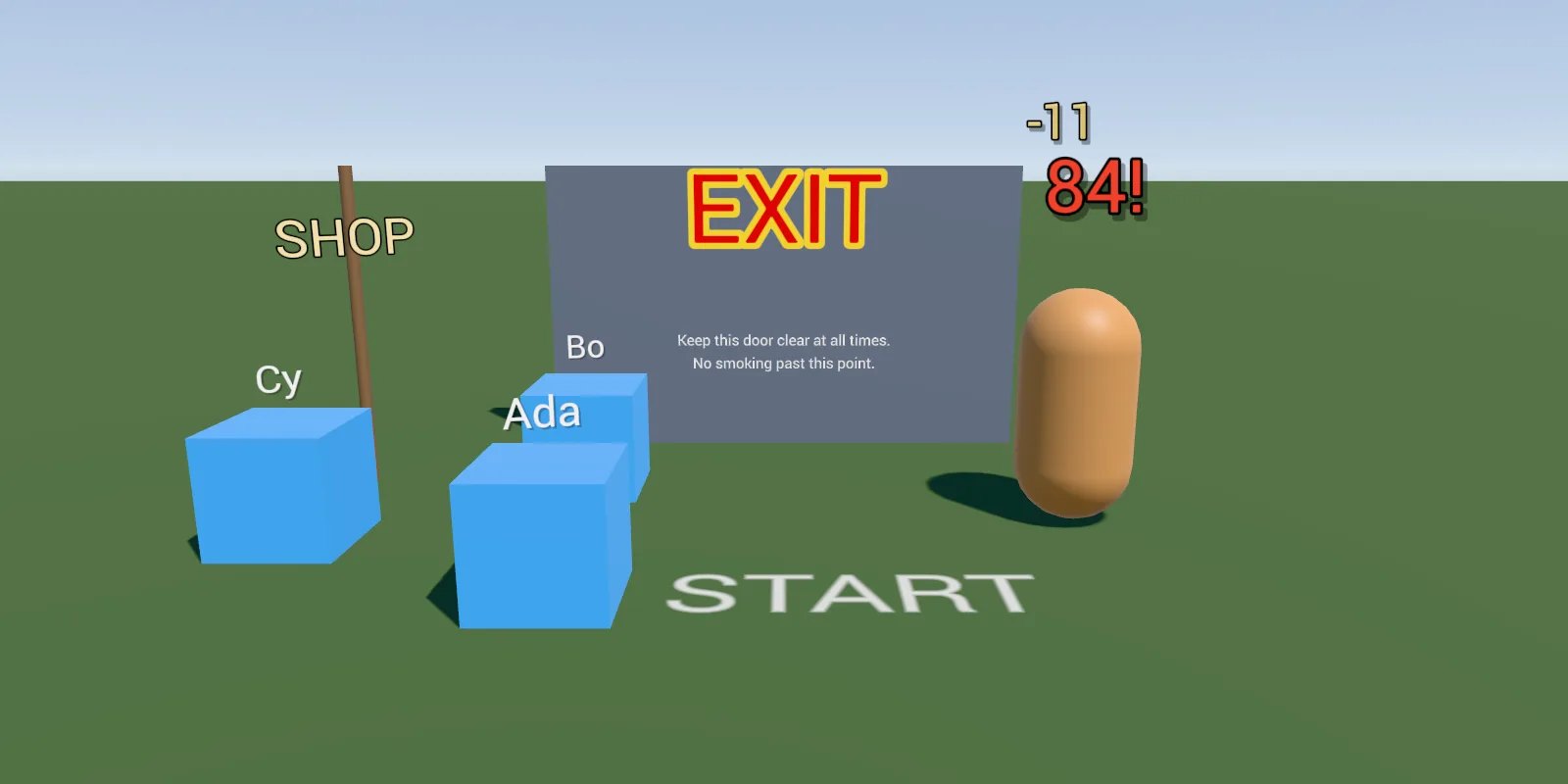
Flutter widgets over the view (A HUD over the game) are the game’s UI. These are drawn in the scene itself, as Unity’s TextMeshPro and Sprite Renderer are: hidden by what’s in front of them, sorted with the rest, as many as a crowd.
A TextRenderer draws flat text, crisp close up and still readable
a few pixels high: a sign, a name over a head, a number popping from a
hit. Its letters come from an atlas the engine makes from the font’s
outlines, once per font. size is the em in metres, as Mesh.text’s,
and align, lineSpacing and font.measure lay it out the same way
(3D text):
/// A shop front: OPEN in red with a white outline, the hours in small/// print under it, and START painted on the ground before it.class ShopFront extends GameObject {  ShopFront() : super(name: 'shop front');
  @override  Future<void> onLoad() async {    super.onLoad();    final font = await world.assets.font('fonts/Roboto-Regular.ttf');    add(      GameObject(        transform: Transform(position: Vec3(0, 2.2, 0)),        components: [          TextRenderer('OPEN', font: font, size: 0.8, color: const Color(0xFFE02020), outline: 0.4, outlineColor: Color.white),        ],      ),    );    add(      GameObject(        transform: Transform(position: Vec3(0, 1.5, 0)),        components: [TextRenderer('9 to 5\nclosed on Sundays', font: font, size: 0.15, lineSpacing: 1.2)],      ),    );    add(      GameObject(        transform: Transform(position: Vec3(0, 0.01, 2)),        components: [TextRenderer('START', font: font, size: 0.9, facing: Facing.up, softness: 0.15)],      ),    );  }}
/// A number popping from a hit: over everything, rising, fading.class HitNumber extends GameObject {  HitNumber(int damage, Font font, Vec3 at)    : _text = TextRenderer(        '-$damage',        font: font,        size: 0.4,        color: const Color(0xFFFFE070),        outline: 0.35,        shadowColor: const Color.rgb(0, 0, 0, 0.6),        facing: Facing.camera,        onTop: true,      ),      super(transform: Transform(position: at)) {    addComponent(_text);  }
  final TextRenderer _text;  double _age = 0;
@override void onUpdate() { super.onUpdate(); _age += time.delta; if (_age >= 1) { destroy(); return; } position = position + Vec3(0, 1.5 * time.delta, 0); _text.color = const Color(0xFFFFE070).withAlpha(_age < 0.5 ? 1 : 2 - 2 * _age); }}- The look:
color; anoutline(0 none, 1 about a ninth of the size) inoutlineColor;softness(0 crisp, 1 blurred, a glow with an outline); a shadow under the letters,shadowColor(none while its alpha is 0),shadowOffsetin ems andshadowSoftness(TextMeshPro’s underlay). - Which way it faces:
facingisFacing.none(turned as its object is, its front along +Z; nothing shows from behind),Facing.camera(square to the camera: a hit number),Facing.upright(turned round to the camera, standing: a name over a head) orFacing.up(flat on the ground). - What hides it: what’s solid in front of it, as any object, unless it’s
onTop: then it’s over everything, walls and all. It’s unlit, shown as its colour says in the dark too, unless it’slit. - What it costs: changing
textlays it out again in the engine and makes nothing once its letters have been seen, so a number changing every frame is fine: 200 of them at once add 0.73 ms to the frame on a Note10+, at 60 fps. Letters are laid out left to right, asMesh.text’s: no right-to-left, no emoji, no bold in the middle of a line.