
Particle basics
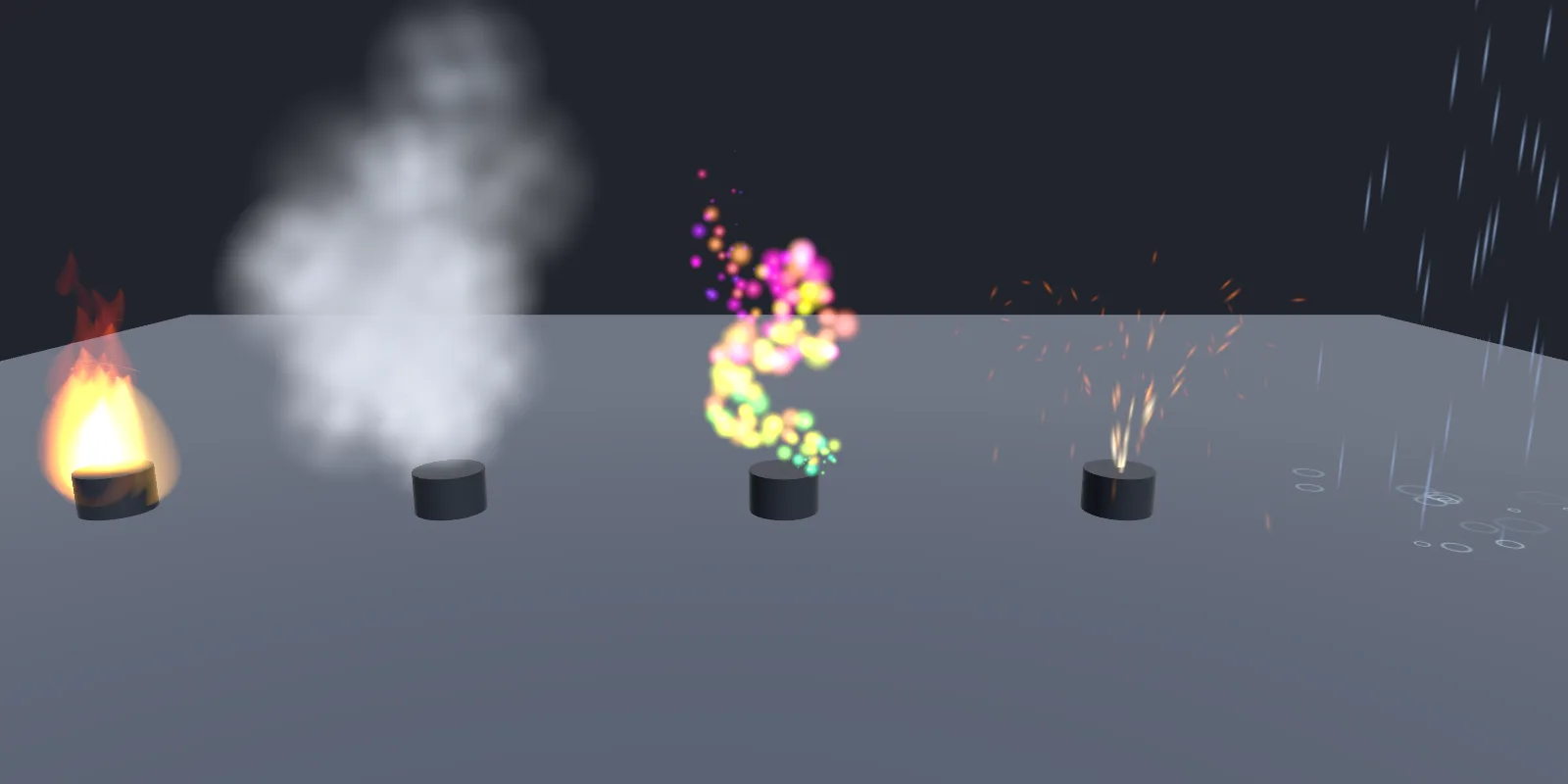
A ParticleSystem is a component, as Unity’s is: smoke, sparks, dust and
splashes, made by the engine. It has Unity’s main module and its defaults
(duration 5 s, looping, startLifetime, startSpeed, startSize,
startRotation, startColor, gravityModifier, simulationSpace,
simulationSpeed, maxParticles 1000, playOnAwake, stopAction,
randomSeed), an emission (a rate a second and up to 8 Bursts), a shape
they’re made in, and a size and a colour over each one’s life.
It draws with its material, as a square facing the camera for each particle;
without one, it moves its particles and draws none.
/// A fountain of water, and sparks that clean up after themselves.class Fountain extends GameObject {  Fountain()    : super(        name: 'fountain',        components: [          ParticleSystem(            startSpeed: const Range(5, 6),            startSize: const Range(0.1, 0.25),            startLifetime: const Range(1.2, 1.6),            gravityModifier: 1,            simulationSpace: ParticleSpace.world,            emission: const Emission(rateOverTime: 120),            shape: ParticleShape.cone(angle: 12.deg, radius: 0.1),            sizeOverLifetime: (t) => 1 - 0.6 * t,            colorOverLifetime: ColorGradient.fadeOut(),            material: Material(color: const Color(0xFF8FD3FF), blending: Blending.transparent),          ),        ],      );
  static final _spark = Material(color: const Color(0xFFFFB347), blending: Blending.additive);
  /// A puff of sparks at [at], on an object that goes when they do.  GameObject sparks(Vec3 at) => add(    GameObject(      transform: Transform(position: at),      components: [        ParticleSystem(          looping: false,          duration: 1,          startSpeed: const Range(2, 5),          startLifetime: const Range(0.5, 1),          stopAction: StopAction.destroy,          emission: Emission(rateOverTime: 0, bursts: [Burst(count: const Range(60, 80))]),          shape: const ParticleShape.sphere(radius: 0.1),          colorOverLifetime: ColorGradient([(0, Color.white), (0.3, const Color(0xFFFFC040)), (1, Color.rgb(1, 0.2, 0, 0))]),          material: _spark,        ),      ],    ),  );}
In detail
Section titled “In detail”Values that vary
Section titled “Values that vary”Range(min, max) is Unity’s “random between two
constants”, picked for each particle as it’s made; Range(5) is a constant.
startColor is a Color, or a ColorRange(a, b) for one between them.
Over a life
Section titled “Over a life”Over a life, from 0 (made) to 1 (gone): sizeOverLifetime is a
function, an Ease or your own, times startSize; colorOverLifetime is a
ColorGradient of stops, times startColor, its alpha fading as the colour
does (ColorGradient.fadeOut(), fadeInOut(color, fadeIn:, fadeOut:)).
Both are read 64 times along the life when set, so they cost nothing a
frame.
Shapes
Section titled “Shapes”Shapes face +Y, as Unity’s do, turned with their object:
ParticleShape.point(), sphere(radius:), hemisphere, cone(angle:, radius:) (Unity’s default), box(size:), circle(radius:, arc:) and
edge(radius:). radiusThickness 0 makes them on the surface alone;
randomDirection 1 sends them any way.
Local or world space
Section titled “Local or world space”In ParticleSpace.local (the default) the
particles move with their object, as a jet’s flame should; in
ParticleSpace.world they stay where they were made, as a trail of smoke
should. Gravity pulls down the world either way.
Playing
Section titled “Playing”It plays when its object comes, unless playOnAwake is false.
play(), stop() (no new ones, those in the air live on), stop(clear: true), pause(), clear(), emit(n) and simulate(seconds) (moved on at
once: an effect seen half-way through); isPlaying, isPaused,
isEmitting, isStopped and particleCount. Turned off, or its object
hidden, it stops and clears; on again, it plays from the start.
When it’s done
Section titled “When it’s done”When it’s done, its last particle gone and not looping, stopAction
does what Unity’s does: destroy destroys its object (a one-off explosion),
disable turns it off (and one from a pool, Pooling, goes back to it, to play again from the start when
get hands it out), callback calls onStopped. emit and play right
after a move make the particles at the new place.
It goes with the game’s time: it holds while the game is paused
and follows time.scale; one with useUnscaledTime goes on, for a pause
menu’s.
Changing it as it plays
Section titled “Changing it as it plays”Every setting can change at any time, and the
particles it has keep going: smoke.emission = Emission(rateOverTime: speed * 4) each frame, as an exhaust follows its speed. A setting is checked as
it’s set, so a wrong one throws there and changes nothing.
Setting one makes nothing, so every frame is fine, even among a thousand
systems; a new function or gradient is read 64 times when it’s set, so give
those once. A TrailRenderer’s are the same.
The material
Section titled “The material”Particles are unlit and fogged, as Unity’s default
particle material is: each one’s colour times the material’s color and its
baseColorTexture (a soft dot, a puff of smoke), plus its emissive.
Blending.transparent lays them over what’s behind, furthest first (sorting
10,000 takes about 0.1 ms on a Mac); Blending.additive adds their light,
for fire, sparks and magic, and needs no order.
A material that isn’t blended is drawn as transparent. Behind something
solid, they’re hidden. Additive ones that overlap add up past white, which
bloom (threshold 1) catches: many near-white sparks or trails on top of each
other glow as one big halo. Darker colours, fewer of them, or a higher bloom
threshold keep it small.