
Meshes and materials
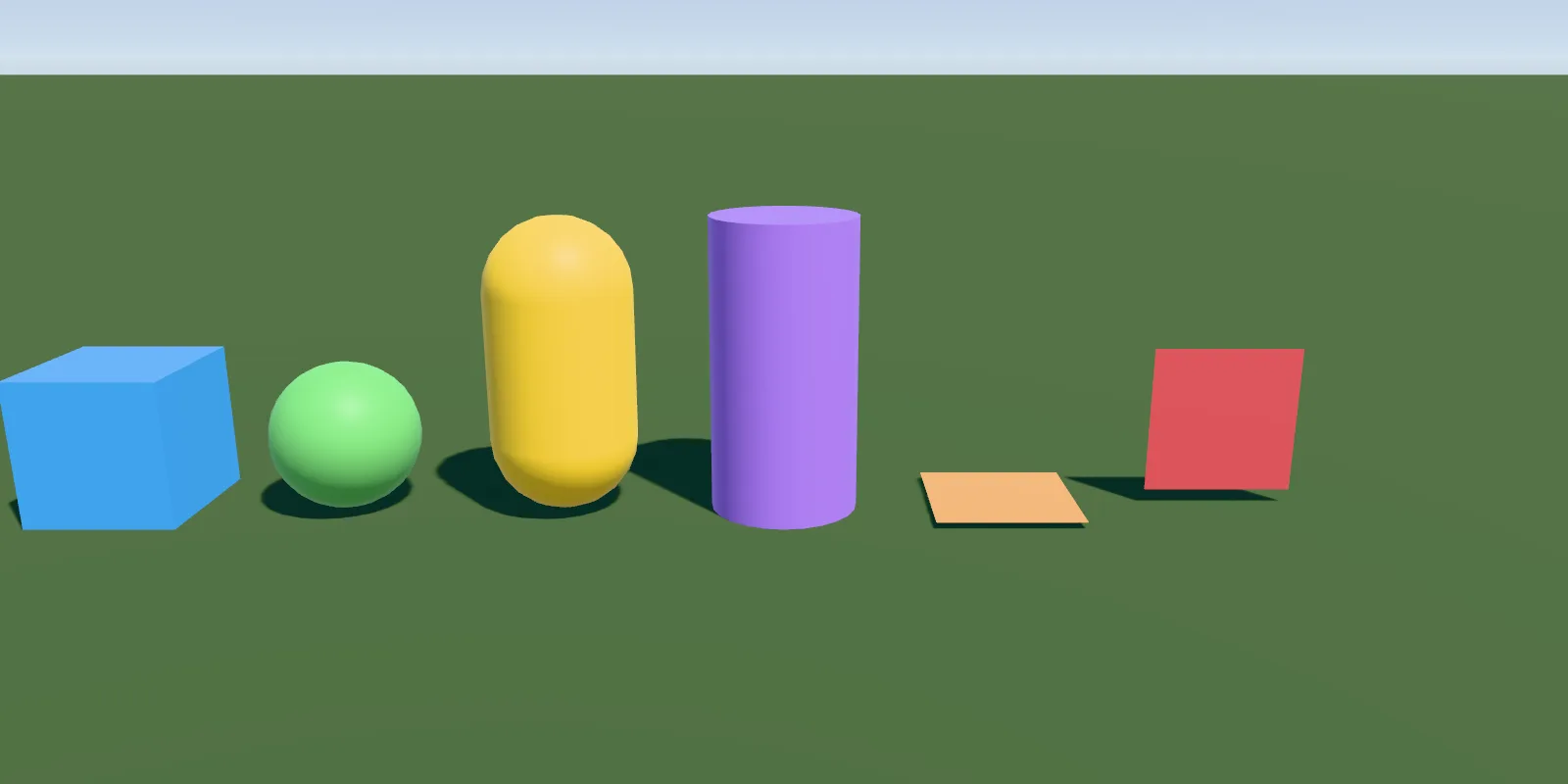
Camera, Light and MeshRenderer are components too, found with
get<T>() and changed in place. Each change goes to the engine at once:
class Beacon extends GameObject {  Beacon()    : super(        components: [          Light.sun(intensity: 2),          MeshRenderer(Mesh.sphere(), Material(color: Color.rgb(0.2, 0.6, 1), roughness: 0.2)),        ],      );
  void dim() {    get<Light>()!.intensity = 0.5;    get<MeshRenderer>()!.material!.color = Color.rgb(0.1, 0.2, 0.4);  }}
Meshes
Section titled “Meshes”| Mesh | Size |
|---|---|
Mesh.cube() |
1 × 1 × 1 |
Mesh.sphere() |
1 across |
Mesh.capsule(), Mesh.cylinder() |
2 high, 1 across |
Mesh.plane() |
1 × 1, lying flat (Unity’s is 10 × 10: scale it by 10) |
Mesh.quad() |
1 × 1, standing, facing +Z |
Others: your own with Mesh.custom(positions:, indices:, …), one made and
changed while the game runs (Meshes that change), shapes
and text drawn in code (Shapes and a mesh builder), and models from
files (Loading assets).
Materials
Section titled “Materials”Materials are physically based:
color |
Its colour |
metallic |
0 for anything else, 1 for metal |
roughness |
0 a mirror, 1 chalk |
emissive, emissiveIntensity |
Lit from within |
uvScale, uvOffset |
How often its textures repeat, and where they start |
One material can be shared by many objects; change it and all of them
change. To change one object alone, give its renderer a color of its own
(Unity’s MaterialPropertyBlock): it replaces the material’s color for that
object, and null gives it back. material.copy() makes a material of its
own to change every value.
A material can also take a shader of your own, a .wgsl file, for what
these values can’t do: grass in the wind, water, a dissolve, a toon look;
and an outline round its objects (A first shader).
Textures
Section titled “Textures”Textures go in baseColorTexture, normalTexture,
metallicRoughnessTexture (metallic in blue, roughness in green),
occlusionTexture and emissiveTexture. Each multiplies its value.
They repeat: uvScale: Vec2(8, 8) tiles one eight times each way across a
plane (grass, bricks, a carpet), and uvOffset slides it (a conveyor belt,
tweened).
Lights and the camera
Section titled “Lights and the camera”Lights are Light.sun, Light.ambient, Light.point
and Light.spot. An object has at most one, so each light goes on an object
of its own. Cameras are components too; the view draws
from the active one, world.camera (Unity’s Camera.main).
Turning one off
Section titled “Turning one off”enabled = false turns any of them off, as a behaviour’s
(Behaviours): a camera draws nothing (the next one
draws), a light lights nothing and isn’t one of the frame’s 64 lamps, a
renderer draws nothing. The object and its other components go on; scripts
and physics still run. Each keeps what it was given, and what’s changed
while it’s off shows when it’s on again.
Nothing to free
Section titled “Nothing to free”You never free a mesh, material or texture: the engine’s copy goes when nothing in the game reaches it any more.